Canva has rolled out more than 100 updates across its Visual Suite, expanding how teams create, edit and move work between formats inside the platform.
The latest changes span presentations, video, Docs, Sheets, Whiteboards and Canva AI, with more emphasis on moving between different forms of creative work without repeatedly rebuilding assets or switching tools.
Canva is also extending AI across more of that environment. Rather than sitting as a separate generation tool, AI is increasingly available while teams are writing, designing, editing, adapting and collaborating.
The direction becomes clearer when Canva’s other recent moves are viewed alongside the Visual Suite expansion.
Creative work is becoming less tied to Canva itself as an interface. Teams can increasingly start work inside ChatGPT, Claude, Copilot or Gemini and bring Canva’s design capabilities, templates and existing brand assets into those conversations.
Canva Is Opening Its Creative System To AI Assistants
Canva has been building connections into the major AI assistants through its AI Connector and Model Context Protocol integrations.
The infrastructure itself has been developing for some time, but what teams can do through it is becoming considerably more useful.
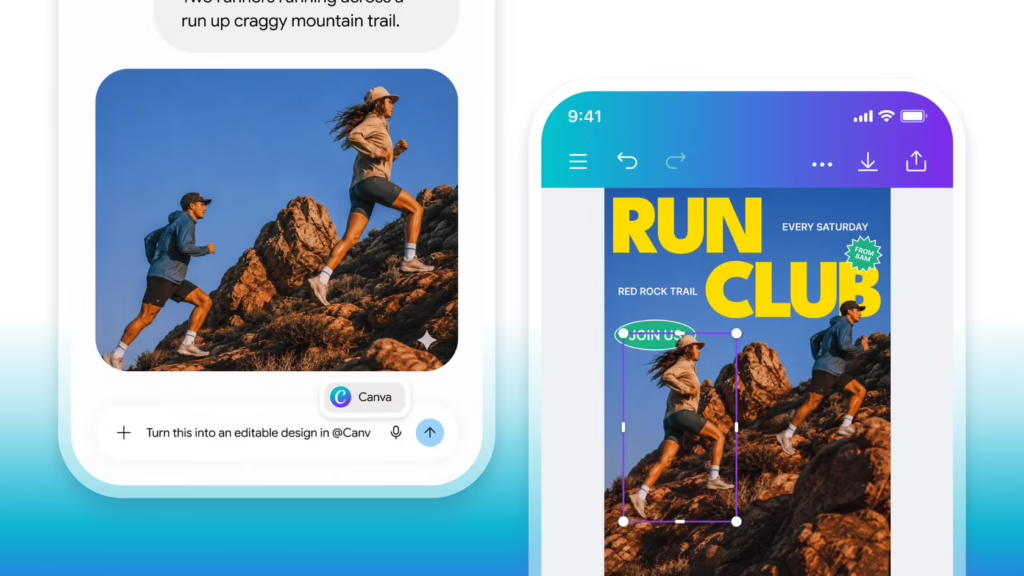
Canva can be connected with ChatGPT, Claude, Microsoft Copilot and Gemini, allowing users to search existing Canva work, access designs and move between an AI conversation and creative production with fewer manual handovers.
Claude Design pushes that further by bringing Canva’s design capabilities directly into Anthropic’s environment.
A marketer could start by developing a campaign idea or content brief in an AI assistant, then move into an editable Canva asset without the familiar process of copying text, opening another tool, locating the relevant template and reconstructing the work.
The assistant becomes an entry point into the creative workflow rather than somewhere work happens before the creative workflow starts.
Brand Setup Becomes Much More Valuable
Connected AI assistants also make the setup inside Canva more consequential.
If a team repeatedly starts from a blank prompt, brand context has to be added each time. Once assistants can work with Canva’s existing environment, brand assets, templates and established creative systems can provide that context more consistently.
Brand voice, visual identity, approved imagery, templates and existing creative become part of the working environment around the AI.
That should reduce some of the repetitive instruction that has characterised early generative AI use.
Rather than repeatedly telling an assistant what the organisation sounds like, which colours it uses and how particular content should be structured, more of that information can already exist within the system being used to produce the work.
The quality of the workspace then becomes part of the quality of the output.
Creative Work Moves Across Formats More Easily
The Visual Suite expansion also continues Canva’s push towards treating different creative formats as parts of the same project rather than separate production jobs.
Campaign work rarely ends with one asset.
An idea may need to become a presentation, social post, video, sales document, internal briefing and paid creative, often with different teams involved along the way.
Canva’s model increasingly allows those outputs to share source material, brand assets and creative context.
AI can accelerate that adaptation, but the bigger efficiency comes from not having to restart the production process every time the format changes.
That should particularly suit marketing and communications teams managing large numbers of related outputs around campaigns, launches and ongoing content programmes.
Grow 2.0 Extends The Workflow Into Paid Media
Canva Grow 2.0, launched in June, shows how far the company wants that connected workflow to extend.
Grow moves beyond making the advertising creative and into parts of campaign execution.
Teams can generate static and video ads from their brand assets, publish directly to platforms including Meta, TikTok and LinkedIn, monitor performance and use those results to influence subsequent creative.
Canva’s AI Ad Tagging can analyse elements such as messaging, formats and creative themes. Performance signals can then help inform which concepts should be produced or refreshed next.
Creative production, media activation and performance feedback start to form a much tighter loop.
Grow does not remove the need for specialist ad platforms or performance teams. Larger advertisers will still need the deeper controls, experimentation and measurement available inside the native platforms.
What it does demonstrate is Canva’s direction.
The company is trying to connect more of the work surrounding the asset rather than stopping once the design is finished.
AI Prompts Become A Smaller Part Of The Job
Taken together, the Visual Suite updates, AI assistant connections and Grow point towards a different model of AI-assisted creative work.
The early generative AI workflow was usually quite fragmented.
Prompt an assistant. Copy the result. Open another application. Find the right template. Add the brand context. Adapt the asset. Send it for review. Upload it somewhere else.
More of those steps can now sit inside connected environments.
That makes individual prompting less central.
Teams still need people who can brief AI effectively, but the quality of the broader system becomes increasingly significant: how the Canva workspace is organised, which brand information it contains, which assistants can access it, how templates are structured and where human review happens.
Human Review Needs To Sit Inside The Workflow
Faster production can easily create more mediocre creative.
AI can generate more variations, adapt assets across formats and accelerate the first draft, but teams still have to decide which ideas deserve to go further.
Review therefore needs to happen throughout the workflow rather than after a large batch of assets has already been produced.
Brand accuracy, factual claims, creative quality and strategic fit still need human judgement.
Better-connected tools can remove plenty of administrative work around production. They do not remove the need for someone to decide whether the work is any good.
Creative Workflows Are Becoming The Bigger Story
Canva began by reducing the technical barrier to producing individual designs.
Its latest updates are increasingly focused on reducing the friction around everything that happens before and after the design itself.
Ideas can originate in different AI assistants. Canva can supply the creative and brand environment around them. Assets can move across formats. Grow can take some of that work into activation and performance.
Creative teams therefore have less reason to think about AI as a collection of isolated tools and prompts.
Workspace setup, brand intelligence, integrations, templates and review processes increasingly shape how useful those tools become.
For marketing and communications teams heading into 2027, the creative advantage may come less from finding another AI tool and more from connecting the ones they already have.








RECOMMENDED FOR YOU
[STUDY] CMOs Demand More From Agency AI
Marketing leaders are raising their expectations of agencies as…
Marketing leaders are raising their expectations of agencies as…
Google Gives Advertisers More AI Max Visibility
Google is introducing new AI Max reporting capabilities, giving…
Google is introducing new AI Max reporting capabilities, giving…
[STUDY] AI Content Production Keeps Accelerating
93% of marketers now use AI to support content…
93% of marketers now use AI to support content…