
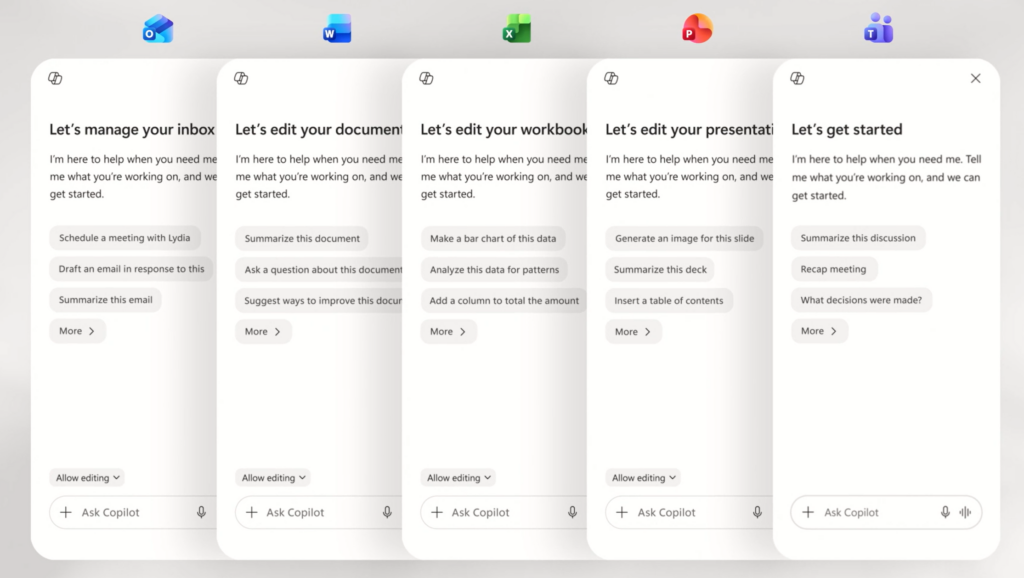
Microsoft has redesigned Microsoft 365 Copilot, cutting app load times by more than 50% and making its AI assistant cleaner, faster and more consistent across Word, Excel, PowerPoint, Outlook and other Microsoft 365 apps.
The update gives Copilot a larger prompt box, a simpler interface and a single entry point across Microsoft 365 apps. Microsoft says the change moves Copilot beyond a static text box and towards a task-aware workspace that adapts to what people are trying to do.
Microsoft 365 Gives Copilot Reach
Marketing and comms teams already live in Microsoft’s workplace stack. Briefs are written in Word. Campaign performance is analysed in Excel. Stakeholder narratives are built in PowerPoint. Approvals, comments and revisions move through Outlook and Teams.
Copilot is not asking teams to adopt a completely new working environment. It is being placed directly into the business processes they already use.
Microsoft’s reach makes the shift harder to ignore. In FY26 Q2, Microsoft said paid Microsoft 365 commercial seats grew 6% year on year to more than 450 million, with installed base expansion across all customer segments, led by small and medium businesses and frontline worker offerings.
Copilot Becomes A Workspace
The redesigned Copilot app puts more weight on the prompt itself. Users now have more room to explain what they need, paste in source material and keep formatting before sending a request. Relevant tools and controls appear beneath the prompt, instead of crowding the interface from the start.
Marketing prompts often need context. A campaign request might include a product update, audience detail, brand guidance, stakeholder feedback and a required output format. A larger, more flexible prompt area should make Copilot better suited to the first stage of planning, where inputs are scattered and the brief is still taking shape.
Microsoft is also using progressive disclosure across the new design. The experience starts simple, then reveals more capability as the task becomes more complex. A left navigation pane expands and contracts to show agents, conversations and history. Shared pinning and improved session recall help users return to work already in progress.
Comms Work Needs Context
Internal announcements, leadership notes, issue responses and campaign narratives rarely land in one clean draft. They move through comments, sensitivities, edits and approvals. A faster first version is useful, but only if the tool can keep enough context to support the next round of work.
Microsoft is also putting more weight on the quality of Copilot’s responses. The company argues that the most important AI experience is not the interface alone, but the output: its tone, structure, readability, usefulness and trustworthiness.
Marketing teams know the cost of weak outputs. A polished but generic draft still needs work. A campaign summary that misses stakeholder nuance creates risk. A performance narrative that overclaims can damage trust. Good AI design should reduce rework, not just produce more material faster.
Work IQ Adds Memory
Work IQ is the more strategic part of the update. Microsoft describes it as an intelligence layer that can draw on emails, files, chats and meetings, while giving users visibility and control when it is active. It can support quick responses or deeper reasoning, including the ability to choose between AI models.
Context is the difference between a draft and a usable draft. A generic AI tool can write copy. A context-aware assistant may understand the campaign objective, source documents, target audience, previous feedback and internal sensitivities.
The use cases are immediate. A campaign manager could turn Teams notes into a structured brief. A content lead could adapt a product update into channel-specific copy. An internal comms manager could draft a leadership message informed by previous stakeholder comments. A performance marketer could ask Excel to explain campaign shifts, then turn those findings into a PowerPoint narrative.
Copilot Fits Existing Habits
The larger opportunity is connecting the fragments of marketing work. Strategy sits in decks. Data sits in spreadsheets. Feedback sits in email. Decisions sit in meetings. Copilot is being designed less as a place to ask isolated questions and more as a layer that helps people move between those fragments.
Microsoft says the redesigned Copilot app now loads more than twice as fast, with load times down by more than 50%. Response times for complex chat prompts have improved by 10%. Since new in-app Copilot experiences were introduced, usage has increased by 27% in Word, 33% in Excel, 43% in PowerPoint and 30% in Outlook.
Those usage figures point to a familiar adoption pattern. AI gets used when it fits the work. Standalone tools may be more specialised, but they require new behaviours. Copilot benefits from existing habits.
Agents Move Into Apps
Microsoft is also moving towards capability-focused agents, including Designer, Researcher, Word, Excel and PowerPoint agents. Rather than pushing every task through one generic chat interface, Copilot can become more specific to the work being done inside each app.
Brand teams need consistency. Content teams need channel adaptation. Comms teams need audience sensitivity. Performance teams need plain-English interpretation of data. Campaign teams need faster movement from scattered inputs to structured plans.
Governance becomes the critical layer. Faster content and analysis only help when teams keep control over accuracy, tone, privacy, approvals and accountability. As Copilot becomes more embedded in documents, decks, spreadsheets and emails, marketing leaders will need clearer rules for how AI is used, reviewed and signed off.
AI Enters The Workflow
Microsoft’s Copilot redesign is a speed and usability update, but the wider story is about workplace AI moving closer to the point of work.
For client-side marketing and comms teams, Copilot’s importance lies in where it sits. Microsoft is placing AI inside the processes where strategy, content, reporting, approvals and stakeholder decisions already happen. That makes Copilot one of the main routes through which AI becomes everyday marketing infrastructure.






















RECOMMENDED FOR YOU
[STUDY] AI Search Shapes Brand Decisions
AI search is starting to influence purchase decisions well…
AI search is starting to influence purchase decisions well…
LinkedIn Lets AI Multiply Ad Creative
LinkedIn is giving advertisers far more freedom to vary…
LinkedIn is giving advertisers far more freedom to vary…
Copilot Lets Marketers Build Apps By Chatting
Microsoft is giving Copilot users the ability to build…
Microsoft is giving Copilot users the ability to build…